Getting your Apple iPad 3G to run on your T-mobile plan.
The Apple iPad 3G is a fantastic device. And although I'm a big believer in T-mobile, the contract free AT&T plan isn't that bad. But maybe you have a T-mobile plan that's better (a lot of people do) for those people or anyone that DOESN'T like AT&T.This option requires two steps
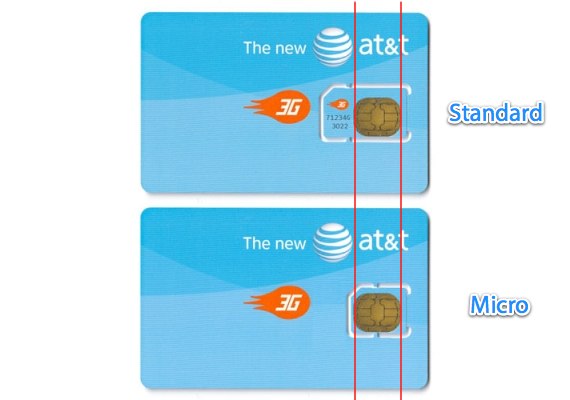
1) To Cut (yes CUT) your T-mobile SIM Chip into the right size. The iPad 3G uses what's called a "micro-SIM Chip".
Simply explained it's a regular SIM Chip (the kind you already have if you have AT&T or T-mobile or any other GSM Carrier) cut to a smaller size.
Of course there's a part with the copper ends, and a part that is either white or colored, but has no metal part of it.
Note: this means you CANNOT return it to an existing t-mobile phone, so make sure it's a t-mobile SIM chip you can LEAVE IN THE iPad!
This picture may help:
2) You must go into your "APN Settings" found in your "control panel" then "Cellular Data" then "APN"
If you have the older phone with T-zones Internet Settings you have to put "wap.voicestream.com"
If you have the new 3G plan and a 3G phone you have to use the "epc.tmobile.com"
Here's a video of this step by step process
Also if you have a Wifi Only iPad, or if you DON'T want ANY seperate plan, there's a step by step video of how to "tether" your iPad to use the Wireless plan of your iPhone (FROM your iPhone, and without removing the SIM chip)
| Comments
